I have been shooting with a Fujifilm camera for a while. There are times where I need to quickly convert my RAW files to JPEG.
In macOS, you can quickly convert RAW file to JPEG through the Right Click -> Quick Actions -> Convert Image.
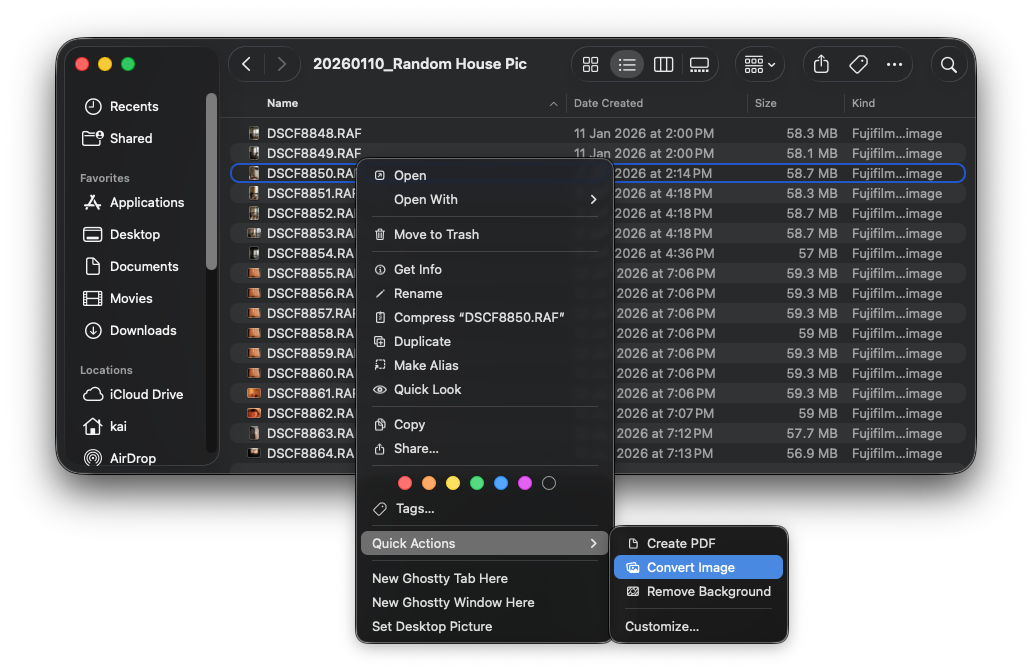
You can also select all of the RAW files and convert them to JPEG in bulk. It takes ~10 seconds to convert 17 RAW files to JPEG and place them in the same folder. Not too bad.
While this approach works, it’s not efficient for me to do it for a large amount of RAW files. Not to mention that I want these JPEG files placed in a separate folder/directory.
So, I decided to write a small CLI to do these more efficiently.
Lazy to read?
Skip to here to get the Python script that takes in a folder with RAW files, converts every Fujifilm RAW file to JPEG, and places the JPEG files in a separate folder.Converting Fujifilm RAW files to JPEG programmatically
The first step is to figure out how to convert Fujifilm RAW files to JPEG programmatically.
It turns out that in macOS, we could use sips to convert a RAW file to JPEG:
sips -s format jpeg DSCF8848.RAF -o test.jpg
sips stands for scriptable image processing system. It comes with macOS by default.
sips - scriptable image processing system.
This tool is used to query or modify raster image files and ColorSync ICC profiles.
Its functionality can also be used through the "Image Events" AppleScript suite.
I was introduced to sips while vibe coding the CLI to convert RAW files to JPEG in bulk.
Apparently, it’s been available in macOS for a long time1.
Good enough? Not quite. It takes roughly ~500ms to convert a RAW file to JPEG with sips:
❯ time sips -s format jpeg DSCF8848.RAF -o test.jpg
/Users/kai/Desktop/2026_RAW/20260110_Random House Pic/DSCF8848.RAF
  /Users/kai/Desktop/2026_RAW/20260110_Random House Pic/test.jpg
sips -s format jpeg DSCF8848.RAF -o test.jpg  0.29s user 0.21s system 88% cpu 0.563 total
I often have hundreds of RAW files that I need to convert. Even doing that in parallel with all of my 14 cores, it would still take ~18 seconds 2.
A faster way
It turns out that the RAW file format by Fujifilm camera actually contains the JPEG data 3.
┌───────────────────┬──────────┬──────────┬───────────────────┐
│ Magic Identifier  │ 0201     │ FF389501 │ Camera String     │
│ (16 bytes)        │ (4 bytes)│ (8 bytes)│ (32 bytes)        │
│ "FUJIFILMCCD-RAW" │          │          │ null-terminated   │
└───────────────────┴──────────┴──────────┴───────────────────┘
┌─────────────┬──────────────────┬─────────────┬──────────────┐
│ Directory   │ Unknown Data     │ JPEG Offset │ JPEG Length  │
│ Version     │ (20 bytes)       │ (4 bytes)   │ (4 bytes)    │
│ (4 bytes)   │                  │             │              │
└─────────────┴──────────────────┴─────────────┴──────────────┘
┌─────────────────────────────────────────────────────────────┐
│ Additional Metadata (N bytes)                               │
└─────────────────────────────────────────────────────────────┘
┌─────────────────────────────────────────────────────────────┐
│ JPEG Image                                                  │
│ (from JPEG Offset, length: JPEG Length)                     │
└─────────────────────────────────────────────────────────────┘
┌─────────────────────────────────────────────────────────────┐
│ Other Data (Remaining bytes)                                │
└─────────────────────────────────────────────────────────────┘
By summing the header bytes, we can determine that the JPEG offset starts at byte 84:
16 + 4 + 8 + 32 + 4 + 20 = 84
Bytes 84–87 (4 bytes) store the JPEG offset, while bytes 88–91 (4 bytes) store the JPEG length. Armed with these two values, we can extract the JPEG data using the following pseudocode:
let raw_bytes = file.read(raw_file_path);
let offset = raw_bytes[84..87] as u32;
let length = raw_bytes[88..91] as u32;
let jpeg_bytes = raw_bytes[offset..offset + length];
The diagram below shows the hex code of the first 127 bytes of Fujifilm RAW file:
❯ hexyl -n 127 DSCF8848.RAF --no-characters
┌────────┬─────────────────────────┬─────────────────────────┐
│00000000│ 46 55 4a 49 46 49 4c 4d ┊ 43 43 44 2d 52 41 57 20 │
│00000010│ 30 32 30 31 46 46 31 35 ┊ 39 35 30 31 58 2d 54 33 │
│00000020│ 00 00 00 00 00 00 00 00 ┊ 00 00 00 00 00 00 00 00 │
│00000030│ 00 00 00 00 00 00 00 00 ┊ 00 00 00 00 30 35 31 31 │
│00000040│ 00 00 00 00 00 00 00 00 ┊ 00 00 00 00 00 00 00 00 │
│00000050│ 00 00 00 00 00 00 00 94 ┊ 00 4a 52 31 00 4a 53 a8 │
│00000060│ 00 00 56 58 00 4a aa 00 ┊ 03 2e c9 40 00 00 00 00 │
│00000070│ 03 2e c9 40 00 00 00 00 ┊ 00 00 00 00 00 00 00    │
└────────┴─────────────────────────┴─────────────────────────┘
We could also use hexdump to show the bytes we are interested in:
❯ hexdump -C -s 84 -n 8 DSCF8848.RAF
00000054  00 00 00 94 00 4a 52 31
          |.....JR1|
These are in hex, so 00 00 00 94 is equivalent to:
❯ printf '%d\n' 0x00000094
148
and 00 4a 52 31 is equivalent to:
❯ printf '%d\n' 0x004a5231
4870705
since this is the bytes length of the JPEG, it also indicates that the JPEG size would be around ~4.9MB 4.
Extracting JPEG bytes with CLI
From here, there are multiple ways to extract the bytes.
Using dd
One could consider using dd
# bs: refers to read/write in n bytes.
# skip: skip n * bs bytes, before copying
# count: copy n * bs bytes
❯ dd if=DSCF8848.RAF bs=1 skip=148 count=4870705 of=test.jpeg
This takes 11 seconds, way slower than using sips because we are reading and writing
1 byte at a time:
4870705+0 records in
4870705+0 records out
4870705 bytes transferred in 11.812244 secs (412344 bytes/sec)
Using tail and head
Another alternative is to use tail with head together:
tail -c +149 DSCF8848.RAF | head -c 4870705 > test.jpeg
It takes roughly ~300ms, slightly faster than using sips:
tail -c +149 DSCF8848.RAF  0.15s user 0.00s system 98% cpu 0.154 total
head -c 4870705 > test.jpeg  0.00s user 0.01s system 5% cpu 0.153 total
Using your own code
You could also write a simple program to extract it. For example, here’s a simple
python script to do that:
with open('DSCF8848.RAF', 'rb') as f:
    f.seek(148)
    with open('test.jpeg', 'wb') as out:
        out.write(f.read(4870705))
This takes ~30ms, 10x faster than the tail and head approach.
❯ time python3 -c "
with open('DSCF8848.RAF', 'rb') as f:
    f.seek(148)
    with open('test.jpeg', 'wb') as out:
        out.write(f.read(4870705))
"
python3 -c   0.02s user 0.01s system 85% cpu 0.030 total
Combining everything into a single script
You could write some bash script to glue everything above together, or just write
a python script 5 to do all of this:
#!/usr/bin/env python3
import struct
import sys

def extract_jpeg(raf_file, output_file='output.jpeg'):
    with open(raf_file, 'rb') as f:
        # Read JPEG offset (bytes 84-87, big-endian)
        f.seek(84)
        jpeg_offset = struct.unpack('>I', f.read(4))[0]

        # Read JPEG length (bytes 88-91, big-endian)
        jpeg_length = struct.unpack('>I', f.read(4))[0]

        print(f"JPEG Offset: {jpeg_offset} (0x{jpeg_offset:x})")
        print(f"JPEG Length: {jpeg_length} (0x{jpeg_length:x})")

        # Extract JPEG data
        f.seek(jpeg_offset)
        jpeg_data = f.read(jpeg_length)

        # Write to file
        with open(output_file, 'wb') as out:
            out.write(jpeg_data)

        print(f"Extracted {len(jpeg_data)} bytes to {output_file}")

if __name__ == '__main__':
    if len(sys.argv) < 2:
        print("Usage: ./extract_jpeg.sh <raf_file> [output_file]", file=sys.stderr)
        print("Example: ./extract_jpeg.sh DSCF8848.RAF test.jpeg", file=sys.stderr)
        sys.exit(1)

    raf = sys.argv[1]
    out = sys.argv[2] if len(sys.argv) > 2 else 'output.jpeg'
    extract_jpeg(raf, out)
You can paste the above into a file extract_jpeg.sh and run:
chmod +x extract_jpeg.sh
to make it executable. Then, you could do:
❯ ./extract_jpeg.sh DSCF8848.RAF output.jpeg
JPEG Offset: 148 (0x94)
JPEG Length: 4870705 (0x4a5231)
Extracted 4870705 bytes to output.jpeg
And all of this just takes ~33ms to complete:
./extract_jpeg.sh DSCF8848.RAF output.jpeg 0.02s user 0.01s system 86% cpu 0.033 total
Converting all RAW files in a folder
With the building block above, one could simply extend it to take in a folder path, then iterate
each RAW file and convert them into JPEG. Here’s the python script 5 to do that:
#!/usr/bin/env python3
import struct
import sys
import os
from pathlib import Path

def extract_jpeg(raf_file, output_file):
    try:
        with open(raf_file, 'rb') as f:
            f.seek(84)
            jpeg_offset = struct.unpack('>I', f.read(4))[0]
            jpeg_length = struct.unpack('>I', f.read(4))[0]

            f.seek(jpeg_offset)
            jpeg_data = f.read(jpeg_length)

            with open(output_file, 'wb') as out:
                out.write(jpeg_data)

            print(f"✓ {os.path.basename(raf_file)} → {os.path.basename(output_file)}")
    except Exception as e:
        print(f"✗ {raf_file}: {e}", file=sys.stderr)

def process_folder(folder_path, suffix='_JPEG'):
    folder = Path(folder_path)

    if not folder.exists() or not folder.is_dir():
        print(f"Error: '{folder_path}' not found or not a directory", file=sys.stderr)
        sys.exit(1)

    raf_files = list(folder.glob('*.RAF')) + list(folder.glob('*.raf'))

    if not raf_files:
        print(f"No RAF files found in {folder_path}", file=sys.stderr)
        sys.exit(1)

    output_folder = folder.parent / f"{folder.name}{suffix}"
    output_folder.mkdir(exist_ok=True)

    print(f"Processing {len(raf_files)} files...")

    for raf_file in raf_files:
        output_file = output_folder / f"{raf_file.stem}.jpeg"
        extract_jpeg(str(raf_file), str(output_file))

    print(f"Done! Output: {output_folder}")

if __name__ == '__main__':
    if len(sys.argv) < 2:
        print("Usage: ./extract_jpeg.sh <folder> [suffix]", file=sys.stderr)
        print("Example: ./extract_jpeg.sh ./RAW_IMAGES _JPEG", file=sys.stderr)
        sys.exit(1)

    folder = sys.argv[1]
    suffix = sys.argv[2] if len(sys.argv) > 2 else '_JPEG'
    process_folder(folder, suffix)
And it only takes around ~50ms to convert 17 RAW files to JPEG:
❯ time ./extract_jpeg.sh 20260110_Random\ House\ Pic
Processing 17 files...
✓ DSCF8849.RAF → DSCF8849.jpeg
✓ DSCF8861.RAF → DSCF8861.jpeg
✓ DSCF8860.RAF → DSCF8860.jpeg
✓ DSCF8848.RAF → DSCF8848.jpeg
✓ DSCF8862.RAF → DSCF8862.jpeg
✓ DSCF8863.RAF → DSCF8863.jpeg
✓ DSCF8864.RAF → DSCF8864.jpeg
✓ DSCF8858.RAF → DSCF8858.jpeg
✓ DSCF8859.RAF → DSCF8859.jpeg
✓ DSCF8854.RAF → DSCF8854.jpeg
✓ DSCF8855.RAF → DSCF8855.jpeg
✓ DSCF8857.RAF → DSCF8857.jpeg
✓ DSCF8856.RAF → DSCF8856.jpeg
✓ DSCF8852.RAF → DSCF8852.jpeg
✓ DSCF8853.RAF → DSCF8853.jpeg
✓ DSCF8851.RAF → DSCF8851.jpeg
✓ DSCF8850.RAF → DSCF8850.jpeg
Done! Output: 20260110_Random House Pic_JPEG
./extract_jpeg.sh 20260110_Random\ House\ Pic  0.02s user 0.02s system 89% cpu 0.050 total
This means that majority of the overhead is due to python start up time:
❯ time python3 -c ""
python3 -c ""  0.02s user 0.01s system 86% cpu 0.027 total
Conclusion
I tried it with a folder with 630 RAW files and now it only takes 2.4 seconds to finish it:
❯ time ./extract_jpeg.sh 2025_RAW/20250620to0625_Kuching\ Trip
Processing 630 files...
✓ DSCF7171.RAF → DSCF7171.jpeg
✓ DSCF7617.RAF → DSCF7617.jpeg
✓ DSCF7603.RAF → DSCF7603.jpeg
✓ DSCF7165.RAF → DSCF7165.jpeg
✓ DSCF7159.RAF → DSCF7159.jpeg
# ...
./extract_jpeg.sh 2025_RAW/20250620to0625_Kuching\ Trip  0.04s user 0.56s system 24% cpu 2.472 total
Could it be faster? Definitely. But this should be sufficient for now.
That’s it. Hope you learn something from this post.
Based on this article which refers to older documentation. ↩︎
500 / 14 =~ 36 batches * 500ms = ~18 seconds ↩︎
The RAF file format is available in https://libopenraw.freedesktop.org/formats/raf/. ↩︎
4 870 805 bytes =~ 4.9MB ↩︎
This python script is written by AI (Claude Haiku 3.5). ↩︎ ↩︎